
PTZ Controller v3 provides 5 ways to control PTZ camera tilt.
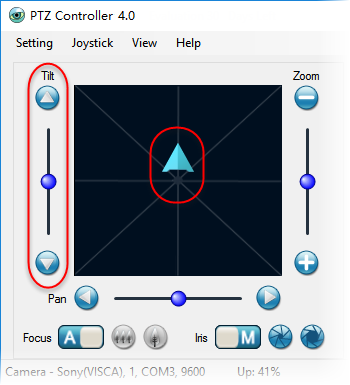
5 ways to control Tilt:
- Click the button
 or
or  to tilt up or tilt down step by step.
 - Drag the circle bar
 to move PTZ camera up or down continuously.
 - In Mouse Control Area, press down the mouse to show control arrow
 . Move the arrow to control.
 - Use numeric keyboard shortcuts,
 for tilt down,
  for tilt up.
 - If joystick or gamepad is connected, you can also control tilt with joystick or gamepad.