|
1. How to Set COM Port
In order to control your device with Relay Timer Lite, be sure
to connect NCD relay board with your computer and connect your device with NCD
8-channel ProXR relay board at first, then set the
port as below.
Click Windows Start Nenu -> All Programs -> Relay Timer Lite -> Configuration
The Configuration dialog will be opened.

Select Port Name and Baudrate.
Click OK to finish setting.
The status of the program can also be set here after logging in Windows. That is
Auto Start and Minimized.
2. How to Turn On/Off Relay Manually
The light on top right of relay control panel indicates the status of the relay.
Red is for relay off. Green is for relay on.
Click
 button
down button
down
 to step into manual
operation mode. to step into manual
operation mode.
Click the
 button to turn on the relay. The light becomes green.
Click the
 button to turn off the relay. The light becomes red.
3. How to Turn On/Off Relay Automatically
Click
 button
down button
down
 to step into manual
operation mode. to step into manual
operation mode.
The default mode is auto mode. The time of the relay on must be set at first.
Click
 button on the
relay control panel to open Relay Setting dialog. button on the
relay control panel to open Relay Setting dialog.
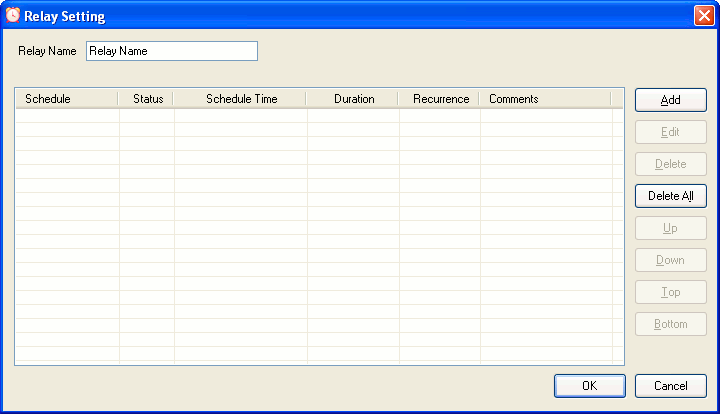
The relay can be given a name here.
Click Add button to open Schedule Setting dialog.
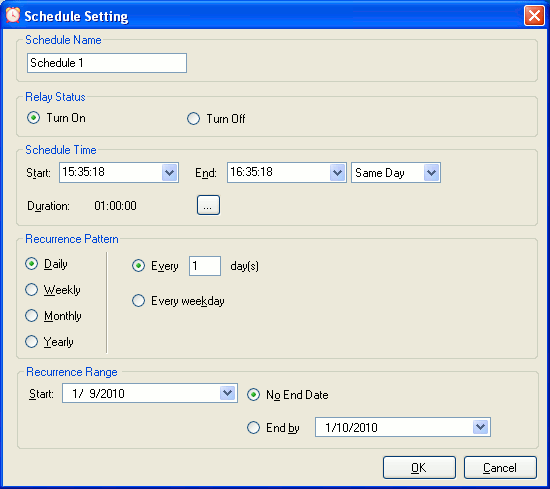
Edit the Schedule Name, select Relay Status,
set Schedule Time, select Recurrence Pattern
and Range .
Click OK to return Relay Setting dialog.
Different schedules can be added by this way.
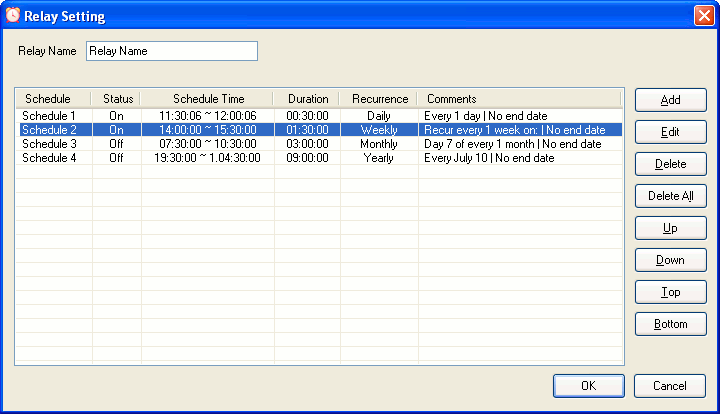
Click OK to finish relay setting.
The relay will be turned on/off automatically according to the schedule list.
4. Rapid Buttons
|
|
Click to load a *.cfg file to get settings of all relays. |
|
|
Click to save settings of all relays to a file (*.cfg) |
|
|
Click to turn all relays off. |
|
|
Click to turn all relays on. |
|
|
Click to invert all relays. |
|
|
Click to set all relays in auto mode. |
|
|
Click to load a *.ptn file to set status of all relays. |
|
|
Click to save current status all relays to a file (*.ptn) |
|


